highlight_colors <- c(
  "Pakistan" = "#B31B1B",
  "China" = "#222222",
  "United States" = "gray45"
)

solar_trend_hl <- solar_trend |>
  mutate(
    highlight = if_else(country %in% names(highlight_colors), country, "Other")
  )

solar_labels <- solar_trend_hl |>
  filter(year == max(year), highlight != "Other") |>
  mutate(country = if_else(country == "United States", "US", country))

solar_mobile <- ggplot(
  data = solar_trend_hl,
  mapping = aes(x = year, y = solar, group = country)
) +
  # context: every other country in light gray
  geom_line(
    data = filter(solar_trend_hl, highlight == "Other"),
    color = "gray80",
    linewidth = 0.6
  ) +
  # focus: the three countries in the story
  geom_line(
    data = filter(solar_trend_hl, highlight != "Other"),
    mapping = aes(color = highlight),
    linewidth = 1.4
  ) +
  # direct labels instead of a legend
  geom_text(
    data = solar_labels,
    mapping = aes(label = country, color = highlight),
    hjust = 0,
    nudge_x = 0.4,
    fontface = "bold",
    size = 3.9
  ) +
  scale_color_manual(values = highlight_colors, guide = "none") +
  scale_x_continuous(
    breaks = c(2010, 2015, 2020, 2025),
    limits = c(2010, 2029.5)
  ) +
  scale_y_continuous(labels = label_percent(scale = 1)) +
  labs(
    title = "Pakistan's solar boom",
    subtitle = "Share of electricity from solar. Pakistan went\nfrom under 1% to 19% in seven years.",
    x = NULL,
    y = NULL,
    caption = "Gray lines: 9 other countries\nSource: Our World in Data"
  ) +
  theme_mobile()

ggsave(
  filename = file.path(mobile_dir, "solar-mobile.png"),
  plot = solar_mobile,
  width = 4,
  height = 5,
  dpi = 270
)Designing for mobile consumption
Lecture 15
Dr. Benjamin Soltoff
Cornell University
INFO 3312/5312 - Fall 2026
October 27, 2026
Announcements
Announcements
- Homework 05 due tomorrow
- Project 02 story due November 11
- Pick your dataset this week
Phone check
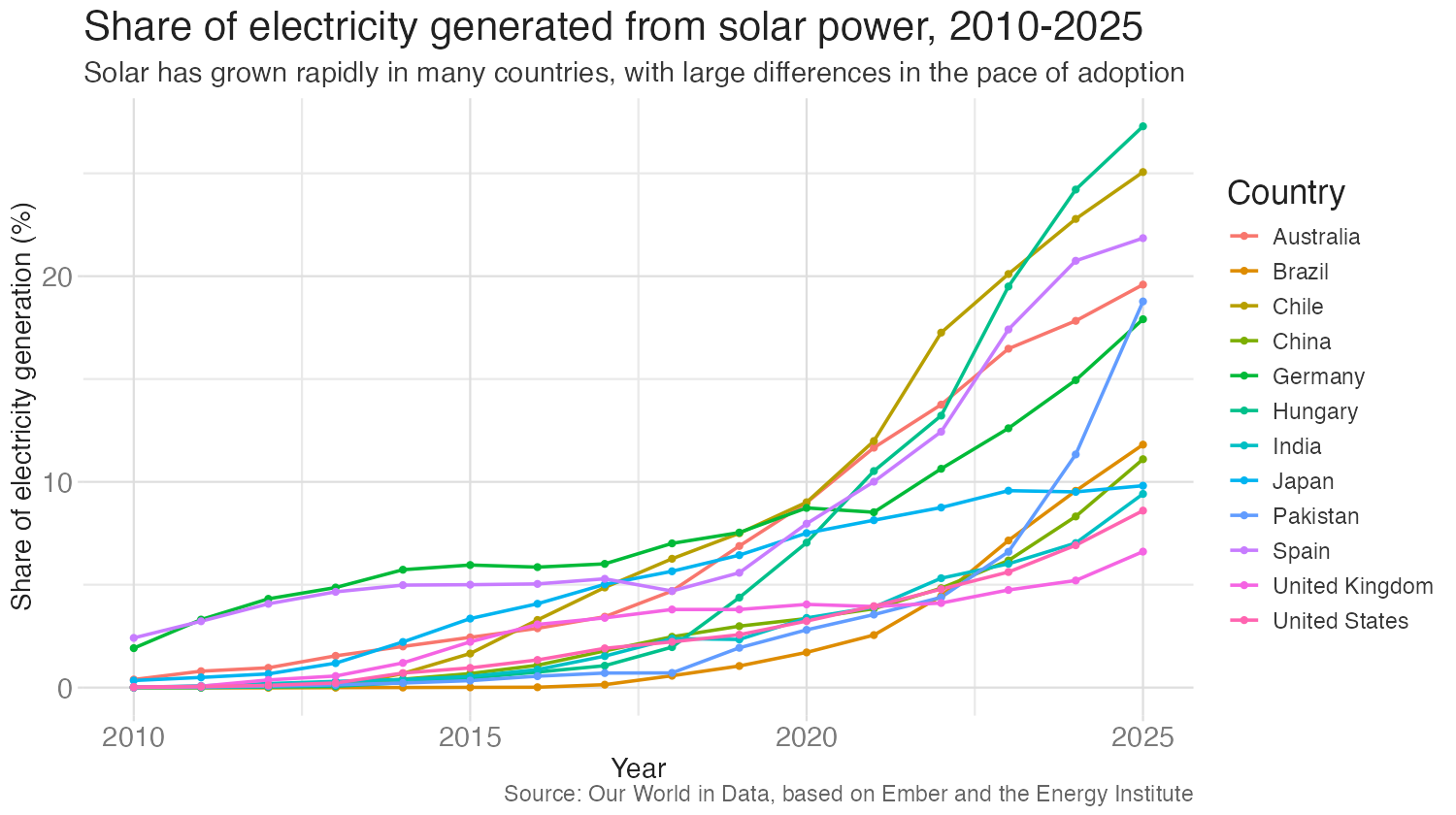
Open this chart on your phone
- What can you read?
- What is the chart’s point?
01:00
Did you spot Pakistan?
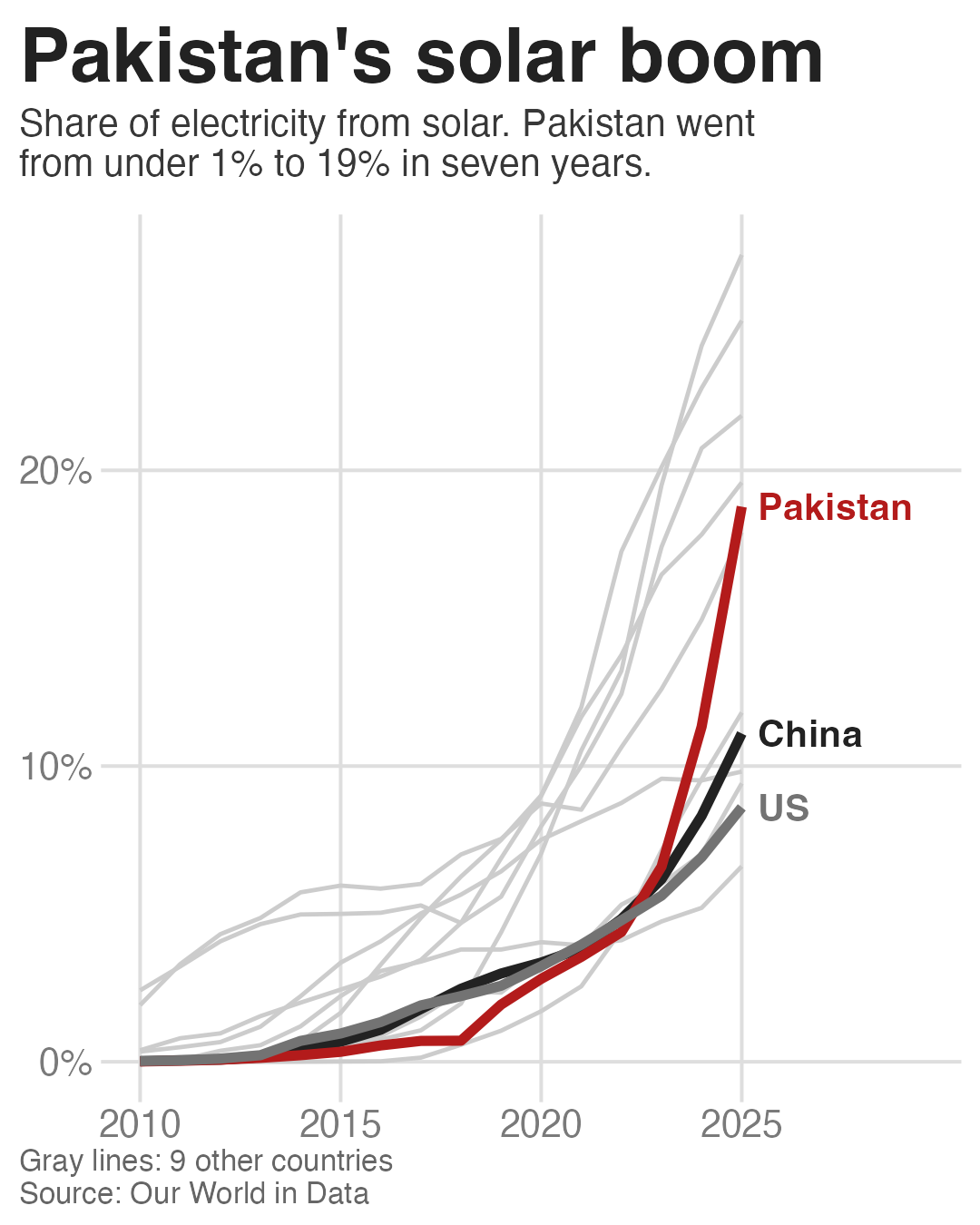
Source: Our World in Data
Learning objectives
- Explain how phone viewing changes what a static chart needs
- Diagnose why a desktop chart fails on a phone
- Redesign a desktop chart for mobile using adaptation strategies
- Export charts with
ggsave()at the right size, resolution, and format - Publish a set of charts as one coherent mobile story with alt text
Why mobile is different
Where people see your charts
- About 360 to 450 pixels wide, held vertically
- Held at arm’s length
- Seen in a feed, for a few seconds, between other posts
- No hover or tooltips. Pinch-to-zoom exists, but few readers bother
- In a carousel, slide 1 is also the thumbnail in the profile grid
Screen pixels vs. viewport pixels
| iPhone 15 | |
|---|---|
| Screen (physical pixels) | 1179 × 2556 |
| Viewport (CSS pixels) | 393 × 852 |
| Physical pixels per CSS pixel | 3 |
- Apps and web pages lay out in viewport pixels
- A 1080-pixel-wide image fills a 393-pixel-wide viewport, drawn with the extra physical pixels
- Design text for the viewport, then export at about 1080 pixels so it stays sharp
- On a web page, side margins make the chart a bit narrower than the viewport
Density vs. message
- Kim, Moritz, and Hullman (2021) compared 378 desktop/mobile pairs of news graphics
- The core trade-off is showing less on a small screen without losing the takeaway
- The authors ranked maintaining takeaways as the most important guideline
- Changes cluster into scale, layout, visual encoding, attentional cues, and interaction (Horak et al. 2021)
What practitioners recommend
- Put the takeaway in the title. It’s the part of a chart people remember most
- Use a familiar chart type
- Make text readable without zooming
- Design for the phone first, then check it on a phone
Sources: Cotgreave (2022); Evergreen
Designing for mobile vs laptop
Discuss
What can a reader do with a chart on a laptop that they cannot do with a chart on Instagram?
What can readers do (or are more likely to do) when reading a visualization on a laptop compared to if they read a chart on Instagram?
02:00
Diagnose
Mobile-readiness checklist
- Is the smallest text readable at phone width without zooming?
- Does the title state the takeaway?
- Do any labels overlap, get cut off, or need a head tilt?
- Does the reader look back and forth between the legend and the data?
- Does the shape fit a portrait screen (tall or square, not wide)?
- Are there more series or categories than a reader can tell apart (about five)?
Your turn: diagnose a chart
Instructions
- Work in groups of 3
- Open your chart on your phone and work through the checklist on the worksheet
- Be ready to share your chart’s single worst failure
Group A
Group B
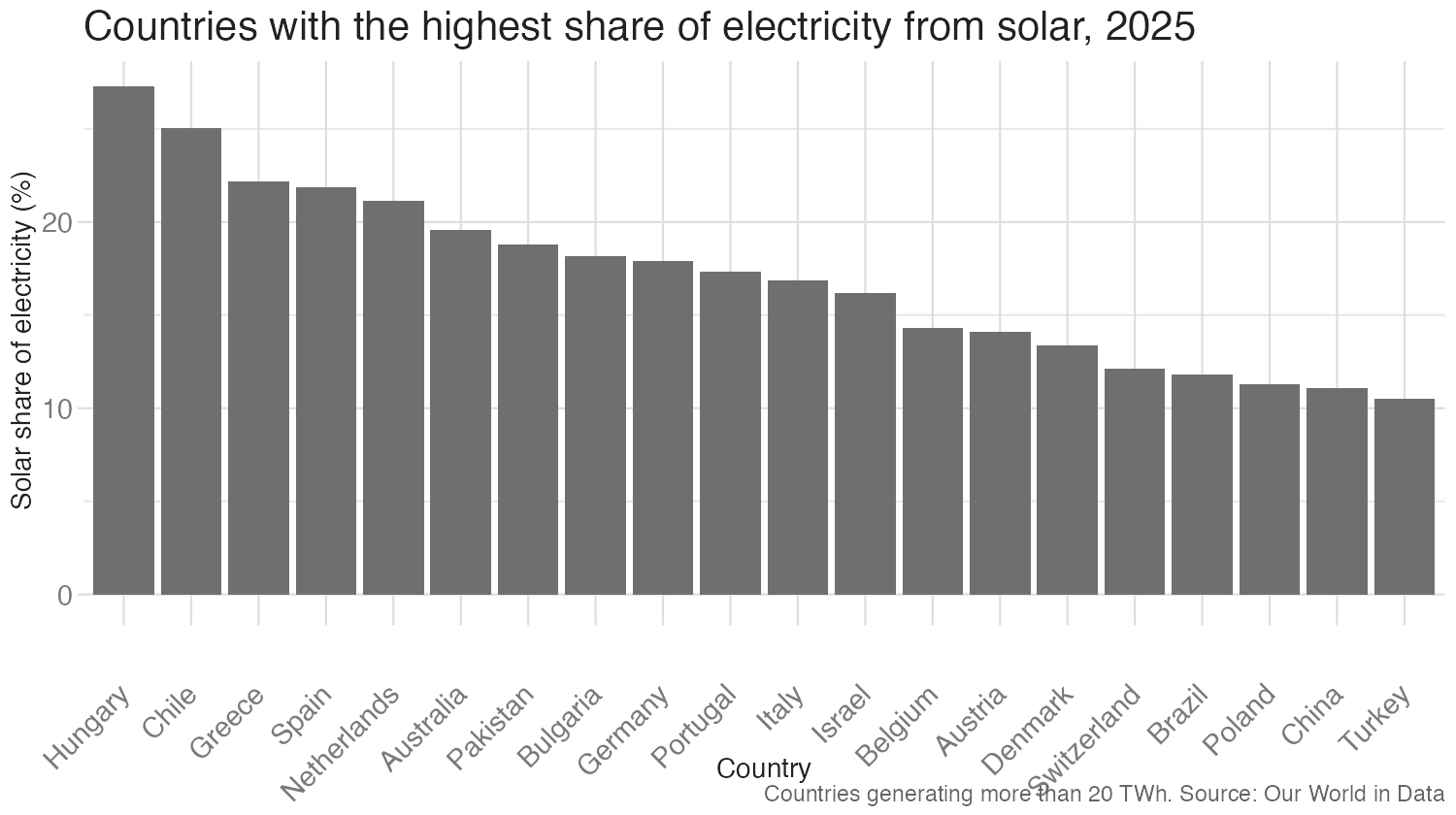
Group C
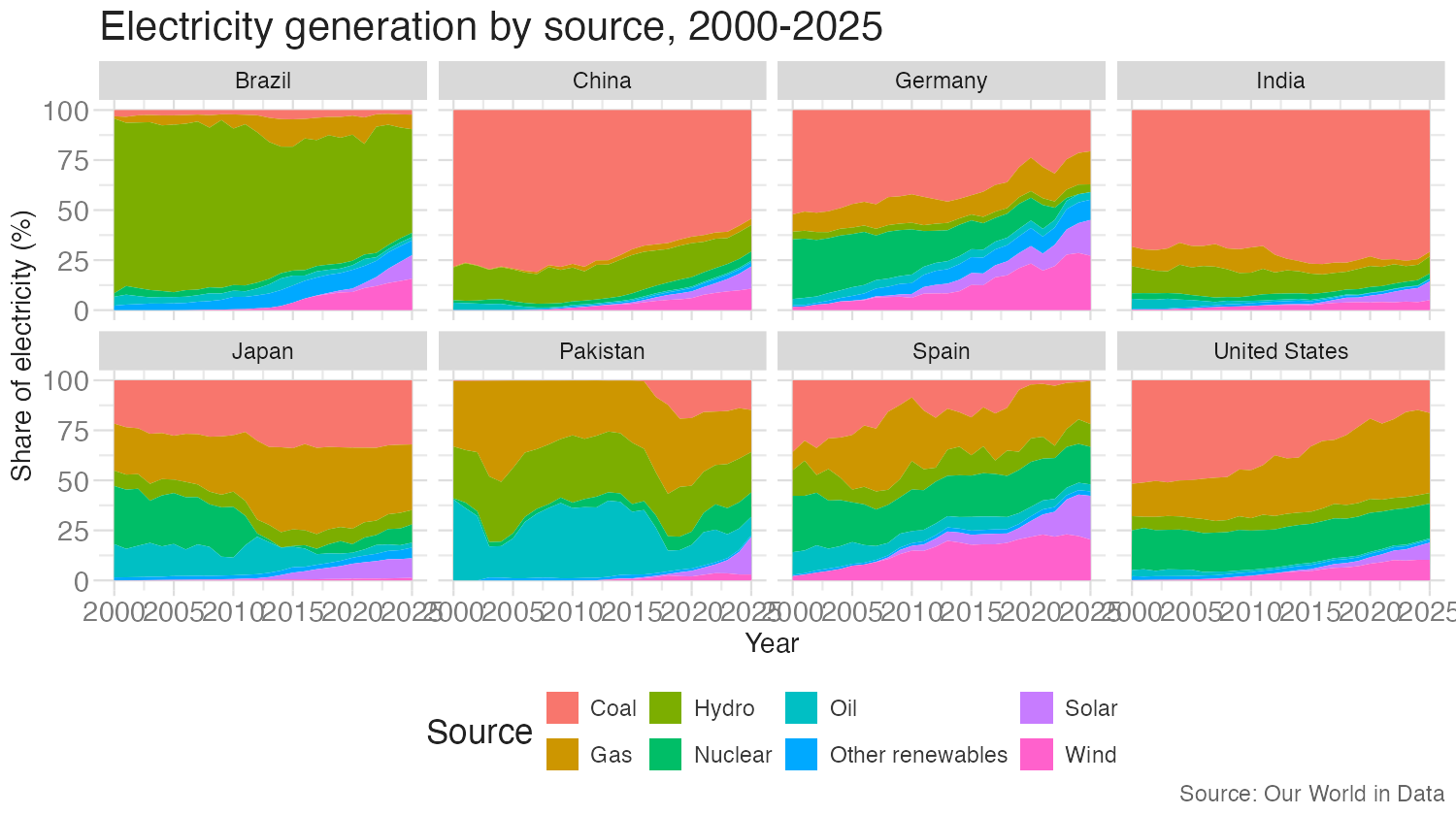
05:00
Redesign strategies
Five strategies
| Strategy | What changes | Implementation |
|---|---|---|
| Resize | Aspect ratio, text size |
ggsave() width/height, theme(base_size = )
|
| Reposition | Legend becomes direct labels; context moves into title and subtitle |
geom_text(), legend.position = “none”, labs()
|
| Reduce | Fewer series, highlight one, top N, aggregate |
Gray + accent colors, slice_max()
|
| Transpose | Flip axes; stack facets vertically |
Swap x and y, facet_wrap(ncol = 1)
|
| Split | One idea per screen; becomes a carousel |
Several plots, several ggsave() calls
|
Adapted from Kim, Moritz, and Hullman (2021) and Hoffswell, Li, and Liu (2020)
Worked example: start
Worked example: resize
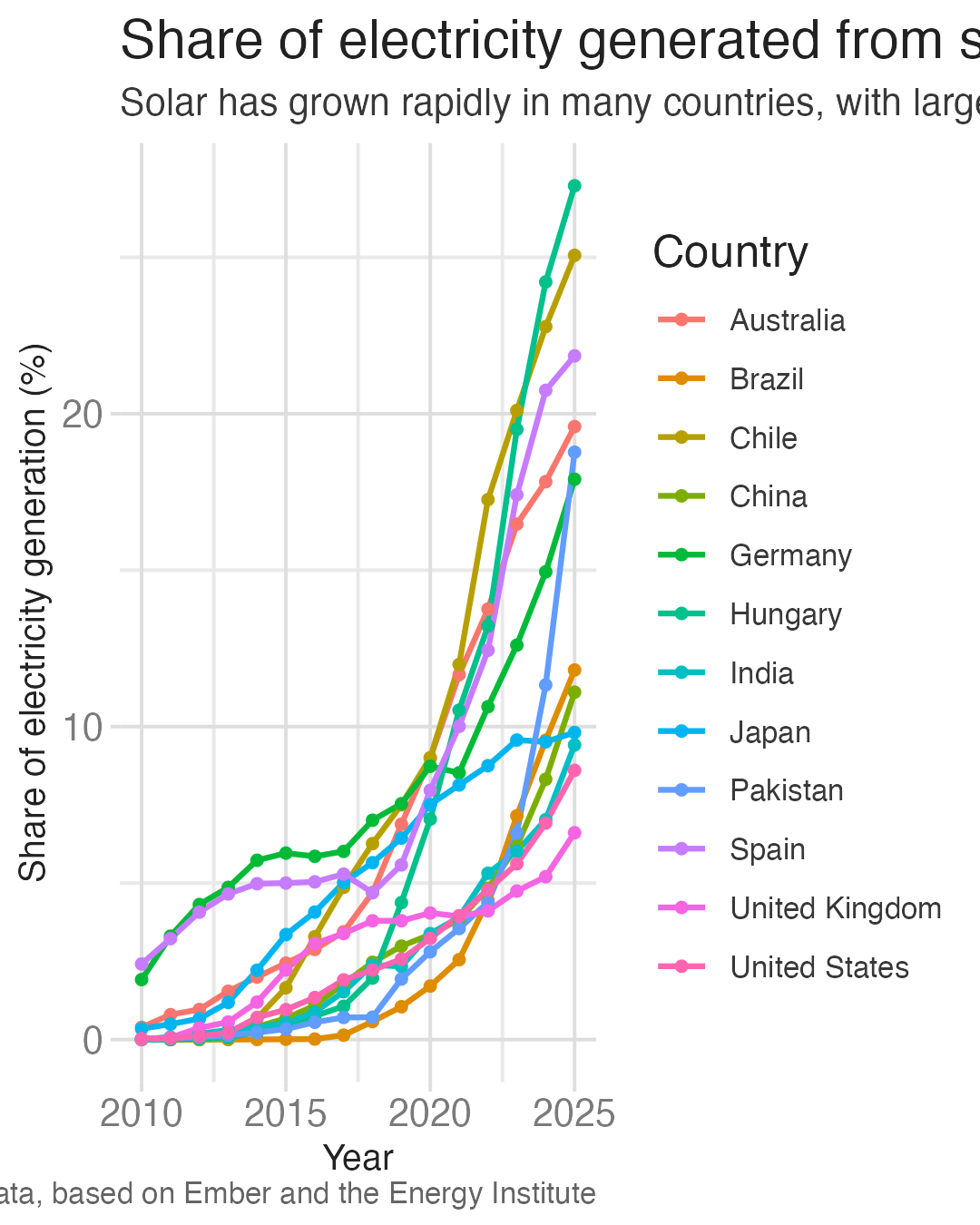
- 4 × 5 inches, portrait, with smaller text
- The text is readable now, but the title is cut off
- The legend takes up almost half the width
Worked example: reduce
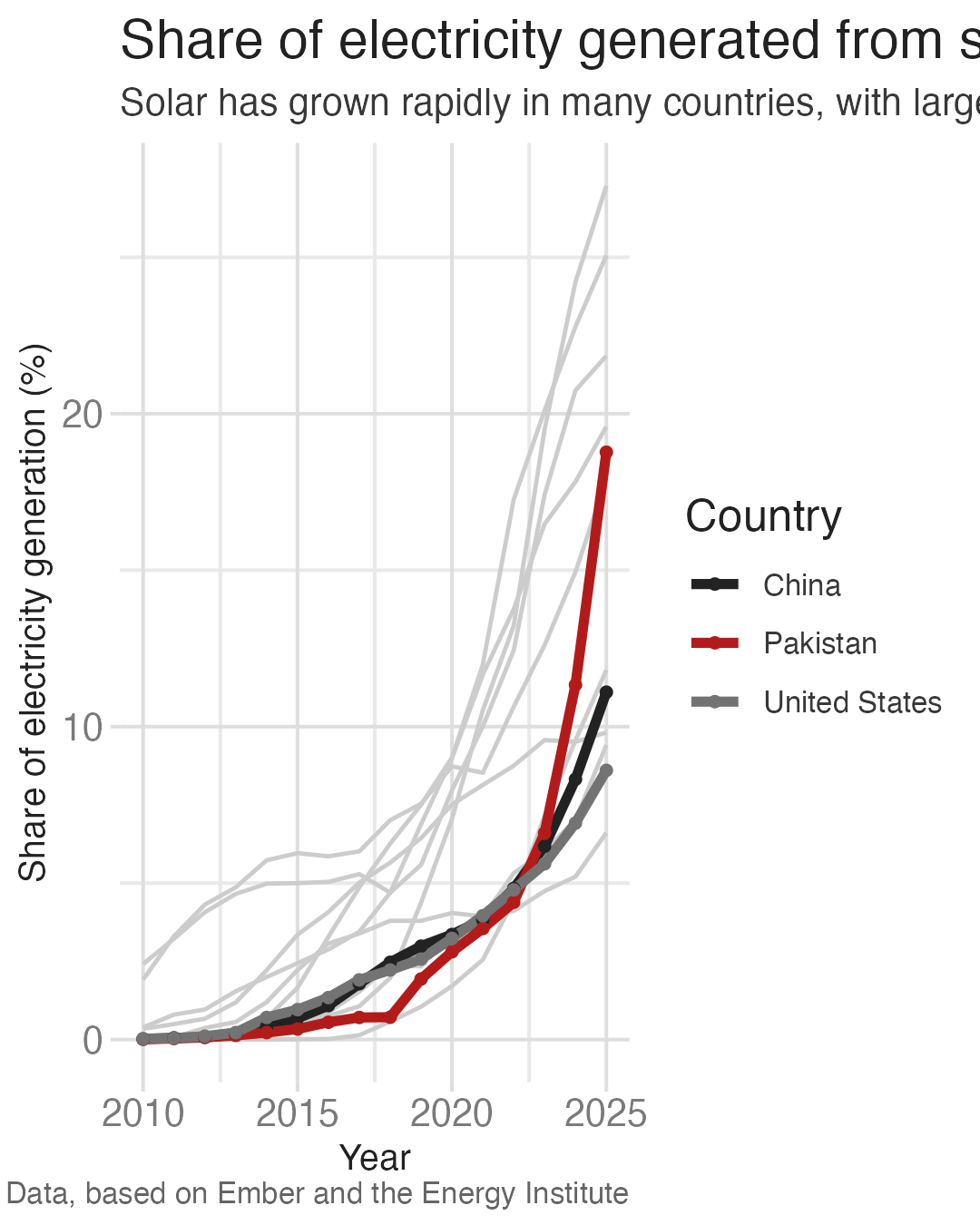
- 3 countries in color, 9 in gray for context
- The story starts to appear
- The legend still costs space and makes the reader look back and forth
Worked example: reposition the labels
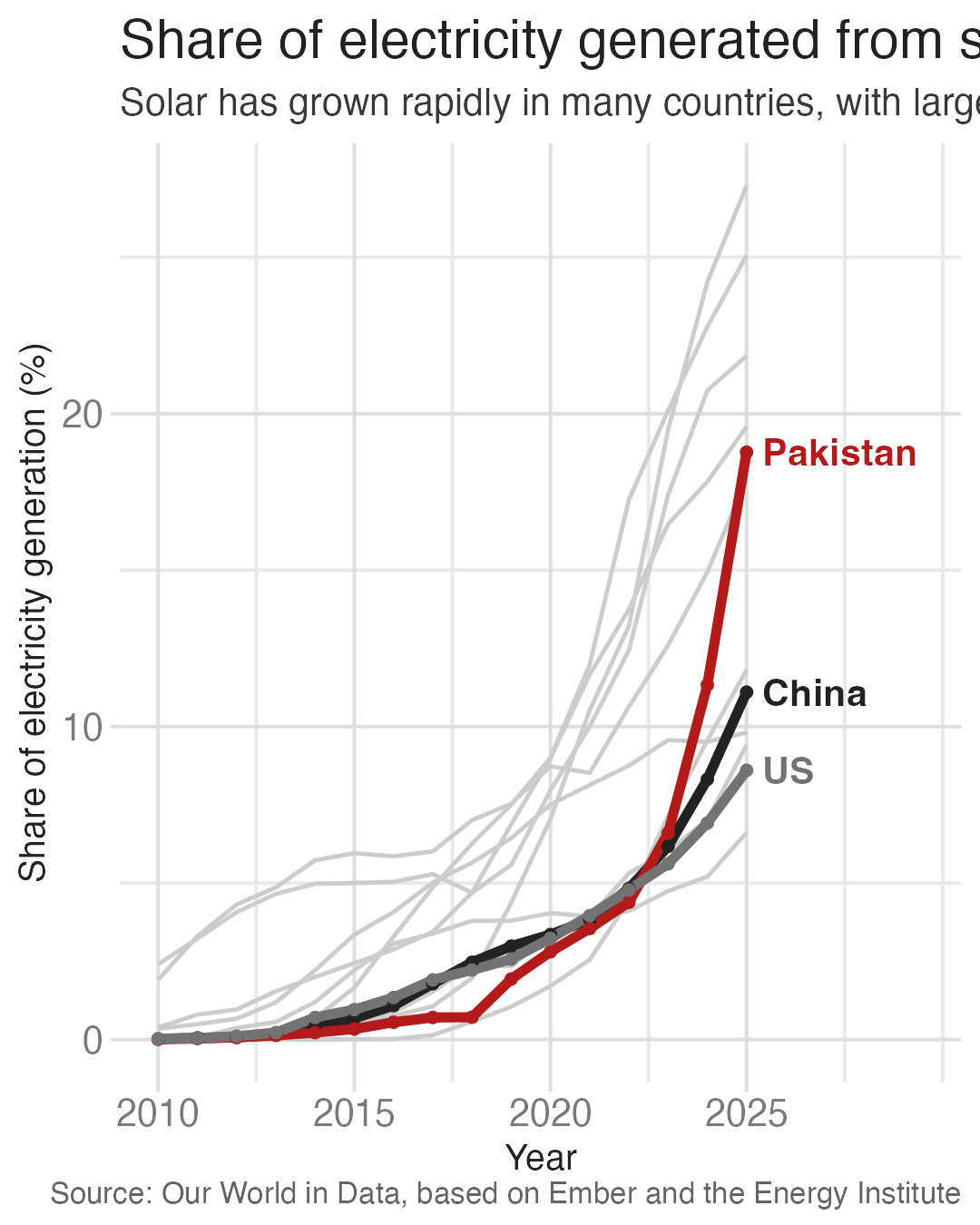
- Direct labels replace the legend
- The plot gets the full width back
Worked example: reposition the takeaway
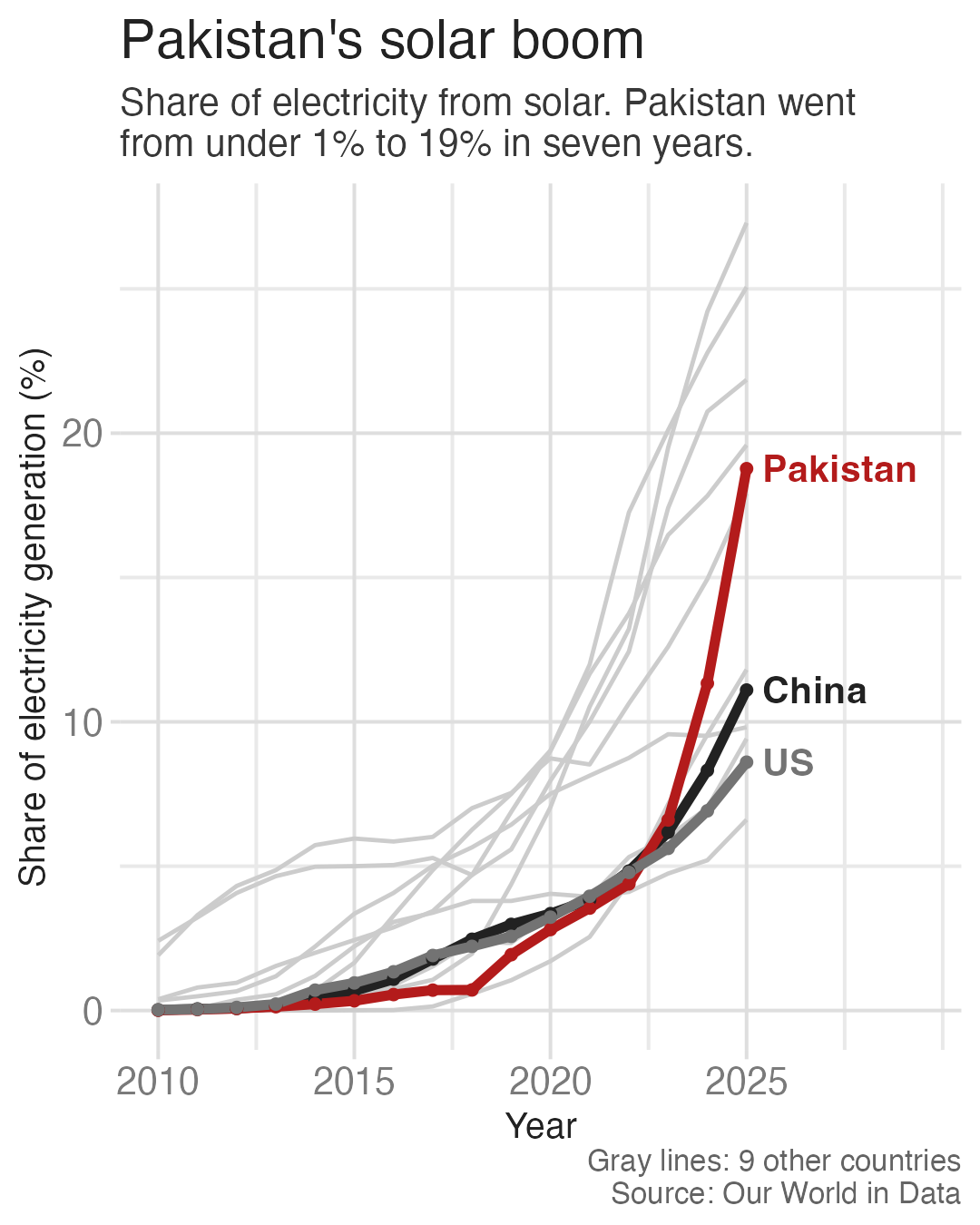
- The takeaway moves into the title and subtitle
- The reader gets the point before reading the chart
Worked example: clean up
- Drop point markers, axis titles, and minor gridlines
- The title and caption align with the left edge of the image
- Hierarchy of information (title, subtitle, caption)
How we built it
Your turn: sketch a redesign
Instructions
- Sketch a mobile version of your group’s chart in the phone frame
- Use at least 3 strategies and name them next to your sketch
- Then swap with another group and check their sketch against the checklist
08:00
Export it correctly
Exporting charts with ggsave()
In a Quarto document, charts render into the document. To post a chart anywhere else, save it as an image file.
The image is width × dpi pixels wide: 4 × 270 = 1080 pixels
Text size depends on width, not dpi
When an image is scaled to fit a phone screen:
text on screen (px) ≈ font size (pt) ÷ 72 × viewport width (px) ÷ ggsave() width (in)
dpicancels out. It only changes sharpness- 11 pt text saved 10 inches wide is about 6 px on a phone
- 11 pt text saved 4 inches wide is about 15 px
Predict
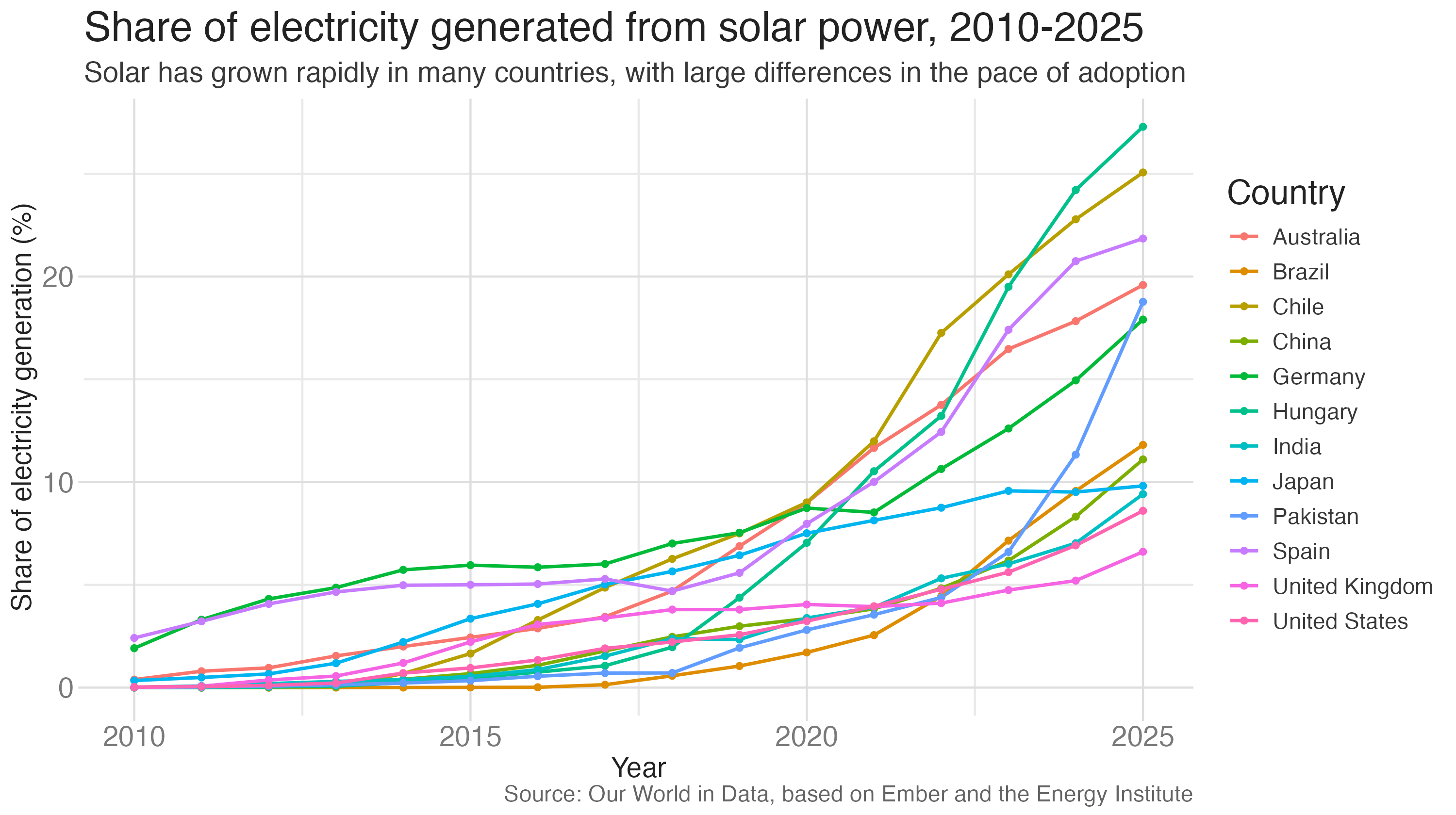
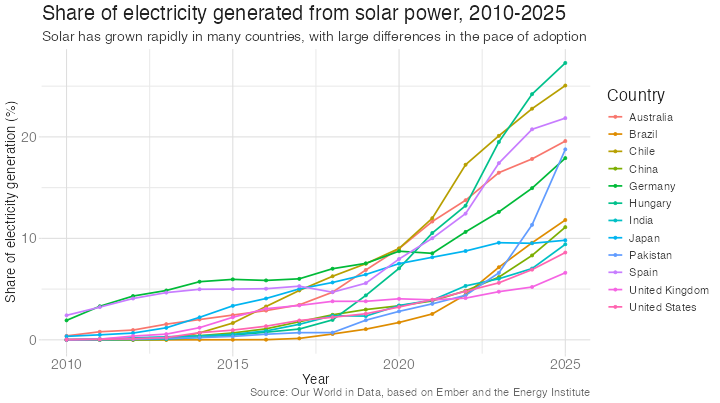
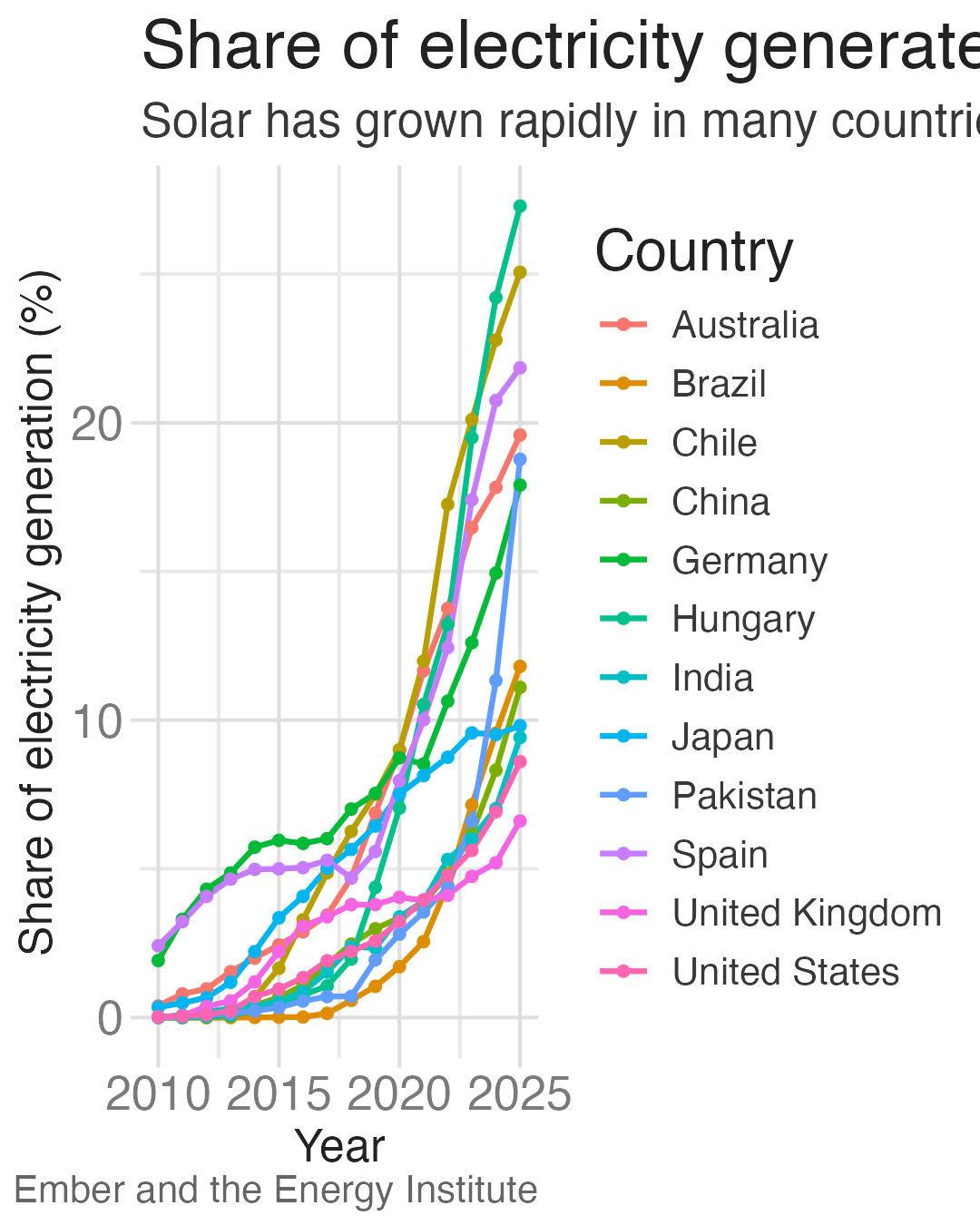
Which will be readable on a phone?
width |
height |
dpi |
Pixels | |
|---|---|---|---|---|
| A | 10 | 5.6 | 300 | 3000 × 1680 |
| B | 10 | 5.6 | 72 | 720 × 403 |
| C | 4 | 5 | 270 | 1080 × 1350 |
01:00
Check it at phone width
A. 10 in, 300 dpi
B. 10 in, 72 dpi
C. 4 in, 270 dpi
Pick a size for the destination
| Destination | Shape | Example ggsave() settings |
Pixels |
|---|---|---|---|
| Instagram feed or carousel (default) | 4:5 portrait | width = 4, height = 5, dpi = 270 |
1080 × 1350 |
| Instagram, posted from the app (since 2025) | 3:4 portrait | width = 4.5, height = 6, dpi = 240 |
1080 × 1440 |
| Bluesky | Square is safest | width = 4, height = 4, dpi = 270 |
1080 × 1080 |
| Web page or blog post | 4:5 portrait* | width = 4, height = 5, dpi = 270 |
1080 × 1350 |
Sizes as of October 2026. Sources: Sked Social; Bluesky image embed lexicon; Roboin. Check before you post.
Image file formats
| Format | Type | Best for | Watch out for |
|---|---|---|---|
| PNG | Raster, lossless | Charts with text, lines, and flat colors | Larger files than JPEG for photos |
| SVG | Vector | Charts on web pages; sharp at any size | Social platforms don’t accept it; text can render in a different font |
| JPEG | Raster, lossy | Photographs | Blurry, blotchy edges around text and thin lines |
| WebP | Raster, lossy or lossless | Smaller files on the web | Not every platform accepts it; needs device = ragg::agg_webp in ggsave() |
Which format should you use?
- Social media. PNG. Every platform accepts it, and text and lines stay crisp
- HTML page rendered with Quarto. PNG or SVG
- PNG (via {ragg}) is the safe default
- SVG stays sharp when readers zoom, but its text uses the reader’s fonts unless you embed them
- Avoid JPEG for charts
Setting size, resolution, and format
With ggsave()
fig-aspis height ÷ width, so 1.25 gives a 4 × 5 inch figurefig-formatacceptspng,svg,jpeg, and others
Implement your redesign
Instructions
- Open
ae-solar-mobilein your web browser - Start from the code for your group’s desktop chart
- Implement at least 3 changes from your sketch
- Export at 4 × 5 inches and check it with
phone_preview()
14:00
Sequence + alt text
Building a carousel
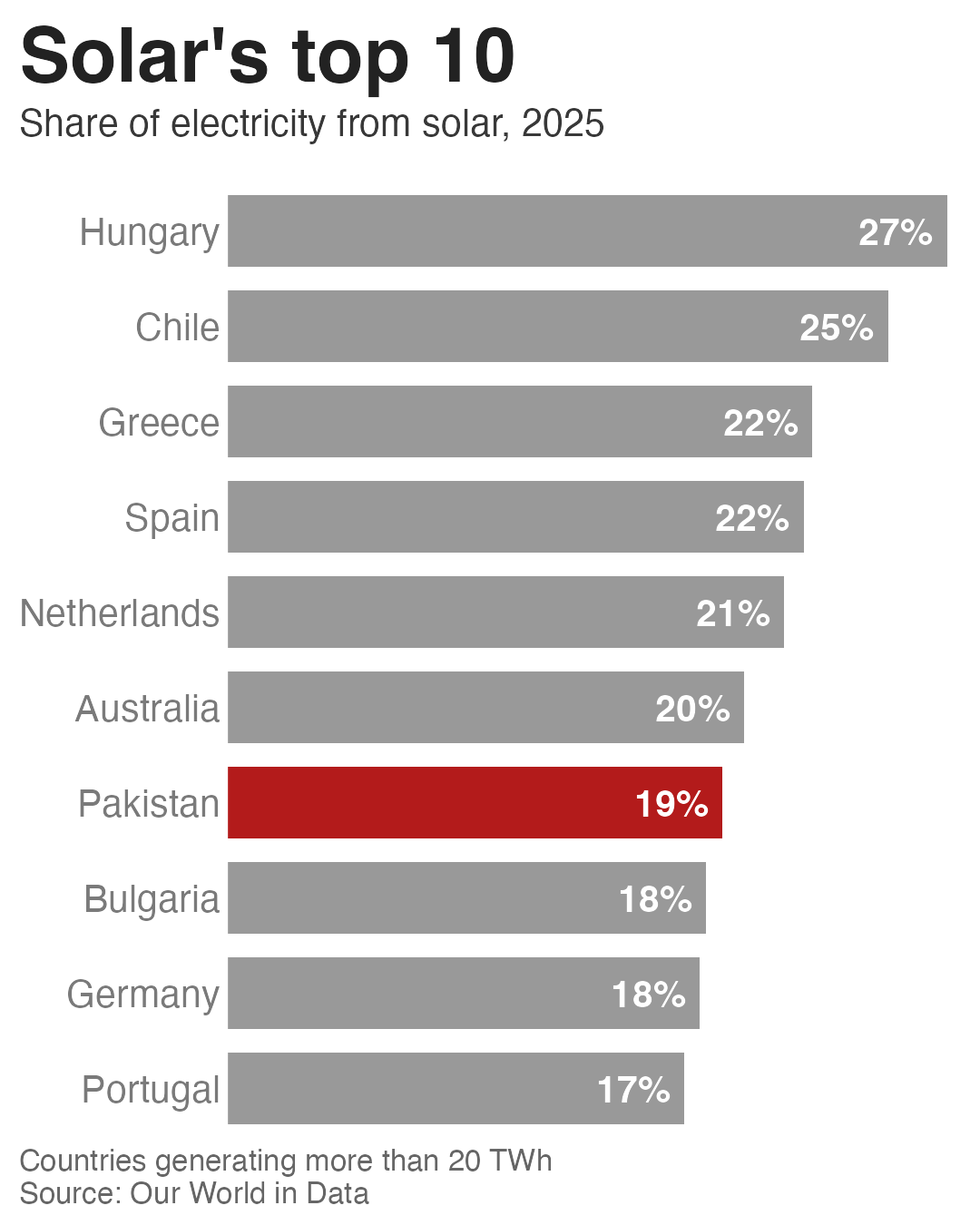
- Slide 1 should immediately catch the reader’s attention and communicate the key takeaway
- One idea per slide
- Use consistent theming across the slides
A finished carousel
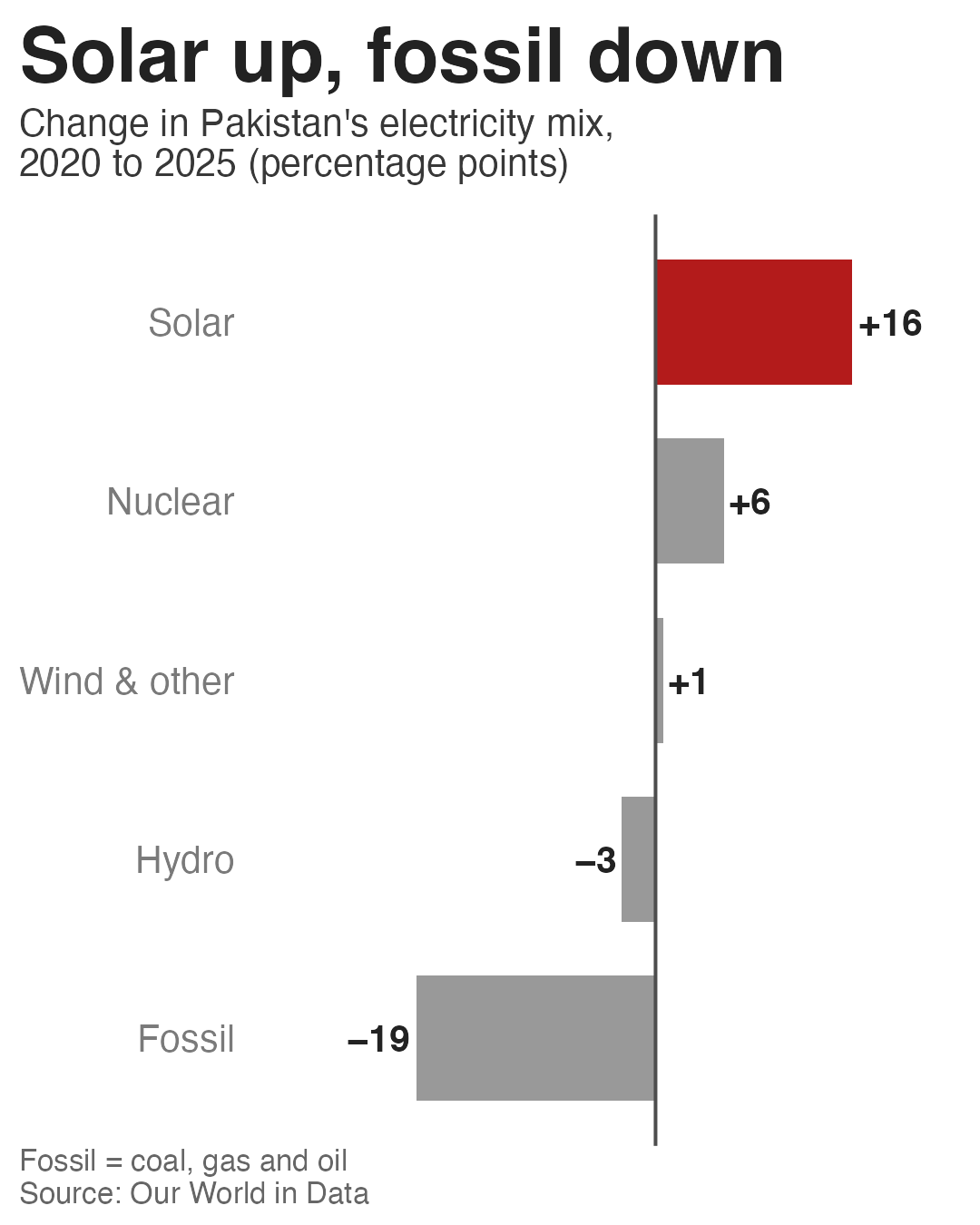
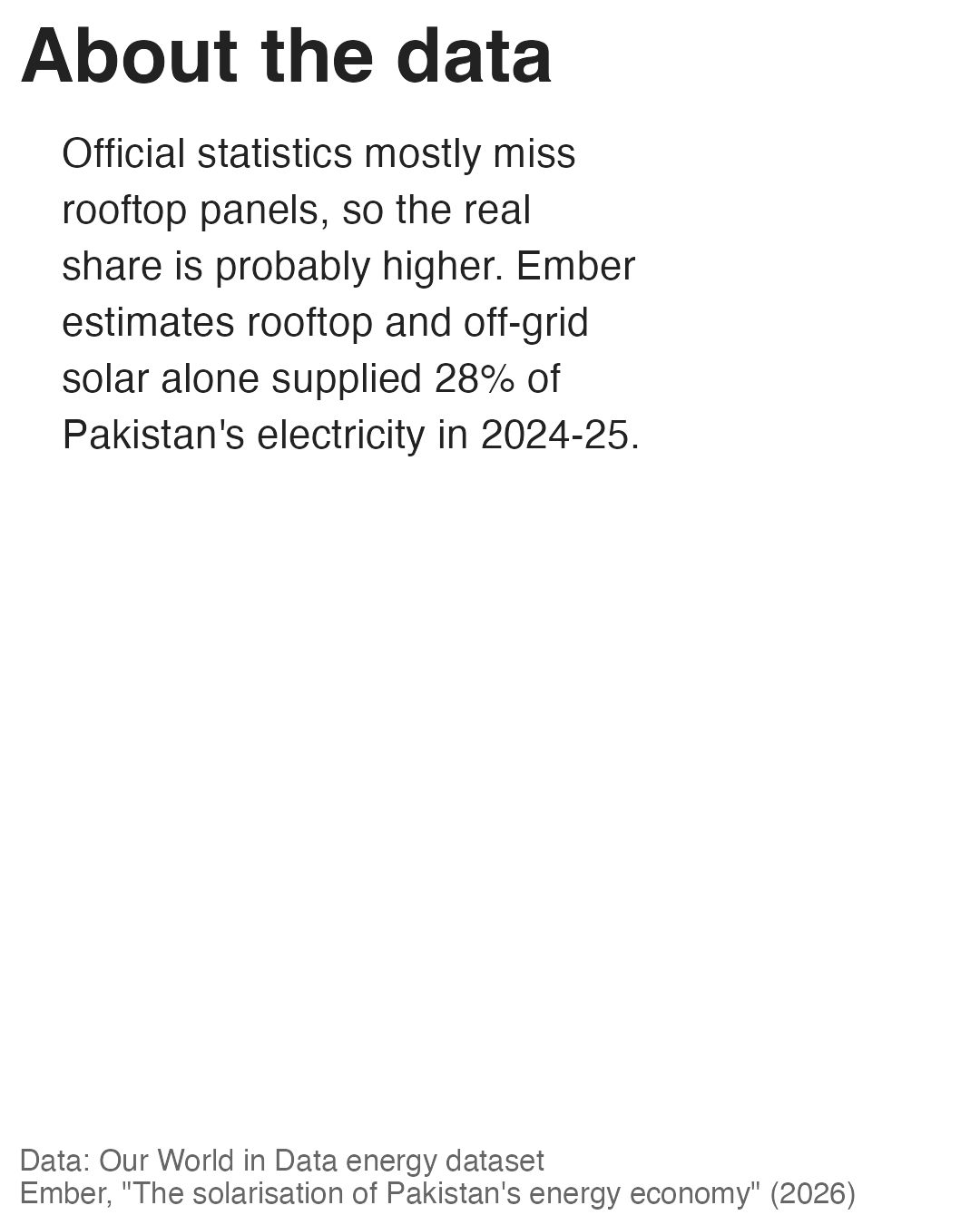
Alt text for every slide
On Instagram
- Each image in a carousel has its own alt text field
- Adding it to slide 1 only leaves the rest without
- Instagram Help Center: alt text
Wrap-up
Recap
- Designing for mobile consumption requires different priorities than designing for a larger screen
- Revise your story to make the takeaway clear, the text readable, and the chart simple enough to understand in a few seconds
- A phone shows your chart about 360 to 450 viewport pixels wide
- Utilize common design strategies to optimize a chart for mobile consumption
