Designing charts for mobile
Parts 1 and 2 are completed on the printed worksheet. Part 3 is completed on this page.
This application exercise is designed to be run in your web browser using the {webr} framework. Simply work through the exercises and use the provided code cells to execute live R code in your browser.
Data
The Our World in Data energy dataset tracks how each country generates its electricity. Each row is one country in one year, from 2000 to 2025. electricity_generation is measured in terawatt-hours (TWh). The columns coal through other_renewables are each source’s share of electricity generation, in percent.
electricity <- read_csv("data/owid-electricity.csv")
electricity
# A tibble: 5,387 × 13
country iso_code year population electricity_generation coal gas oil
<chr> <chr> <dbl> <dbl> <dbl> <dbl> <dbl> <dbl>
1 Afghanist… AFG 2000 20130334 0.48 0 0 35.4
2 Afghanist… AFG 2001 20284303 0.69 5.80 0 21.7
3 Afghanist… AFG 2002 21378123 0.71 5.63 0 15.5
4 Afghanist… AFG 2003 22733053 0.91 9.89 0 20.9
5 Afghanist… AFG 2004 23560656 0.79 7.60 0 21.5
6 Afghanist… AFG 2005 24404575 0.82 7.32 0 20.7
7 Afghanist… AFG 2006 25424100 0.9 16.7 0 12.2
8 Afghanist… AFG 2007 25909852 1.01 14.9 0 10.9
9 Afghanist… AFG 2008 26482631 0.78 16.7 0 14.1
10 Afghanist… AFG 2009 27466102 0.89 6.74 0 5.62
# ℹ 5,377 more rows
# ℹ 5 more variables: nuclear <dbl>, hydro <dbl>, wind <dbl>, solar <dbl>,
# other_renewables <dbl>Part 1: Diagnose
Your group is assigned one of the three charts below. Each was designed for a full-width web page. Open your chart on your phone (scan the QR code on the slide) and work through the mobile-readiness checklist on your worksheet.
Chart A: solar share over time
Code
solar_countries <- c(
  "Australia",
  "Brazil",
  "Chile",
  "China",
  "Germany",
  "Hungary",
  "India",
  "Japan",
  "Pakistan",
  "Spain",
  "United Kingdom",
  "United States"
)

solar_trend <- electricity |>
  filter(country %in% solar_countries, year >= 2010) |>
  select(country, year, solar)

ggplot(
  data = solar_trend,
  mapping = aes(x = year, y = solar, color = country)
) +
  geom_line(linewidth = 0.8) +
  geom_point(size = 1.2) +
  labs(
    title = "Share of electricity generated from solar power, 2010-2025",
    subtitle = "Solar has grown rapidly in many countries, with large differences in the pace of adoption",
    x = "Year",
    y = "Share of electricity generation (%)",
    color = "Country",
    caption = "Source: Our World in Data, based on Ember and the Energy Institute"
  )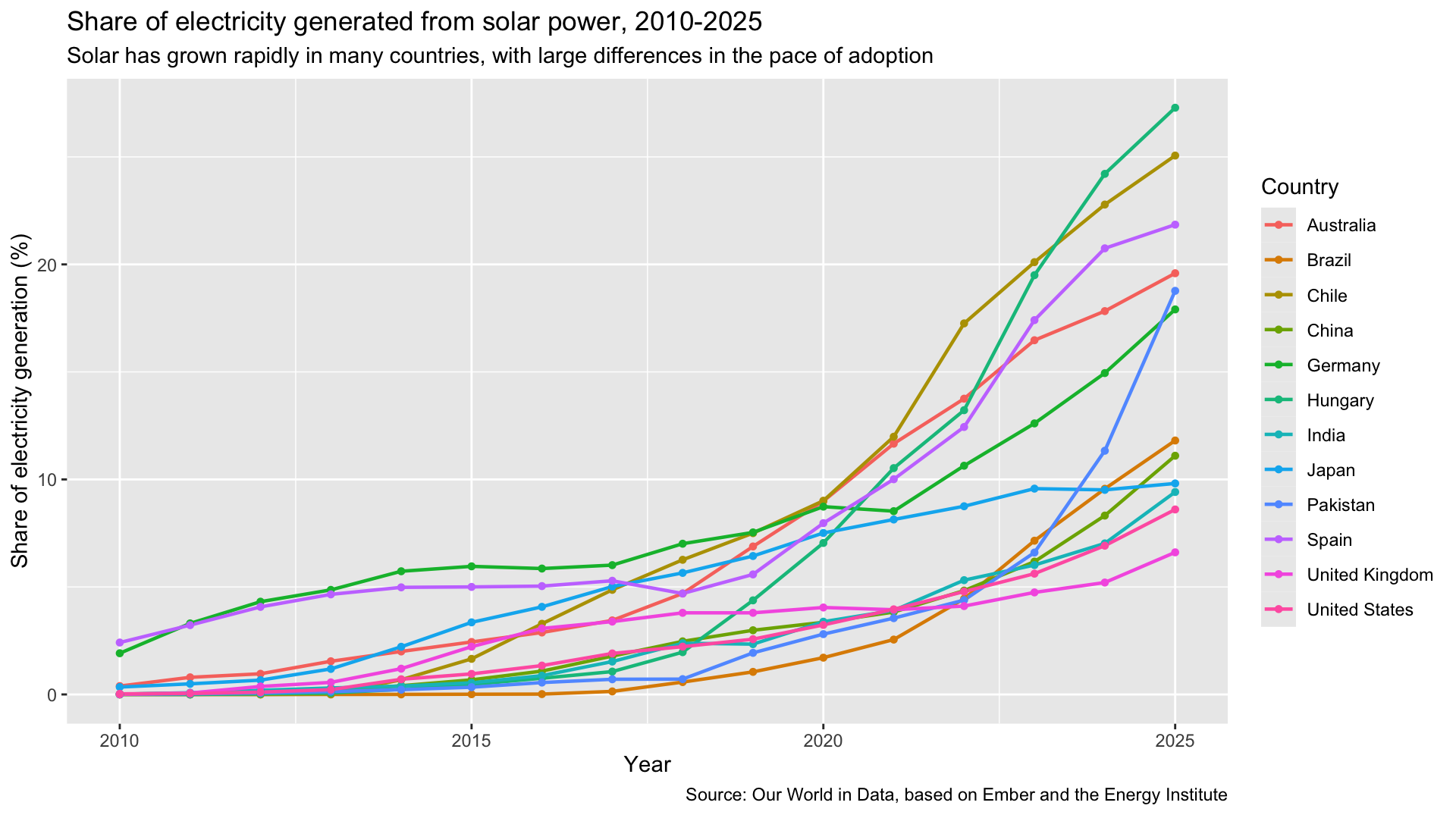
Chart B: solar leaders in 2025
Code
solar_2025 <- electricity |>
  filter(year == 2025, electricity_generation > 20) |>
  slice_max(order_by = solar, n = 20)

ggplot(
  data = solar_2025,
  mapping = aes(x = fct_reorder(country, solar, .desc = TRUE), y = solar)
) +
  geom_col() +
  labs(
    title = "Countries with the highest share of electricity from solar, 2025",
    x = "Country",
    y = "Solar share of electricity (%)",
    caption = "Countries generating more than 20 TWh. Source: Our World in Data"
  ) +
  theme(axis.text.x = element_text(angle = 45, hjust = 1))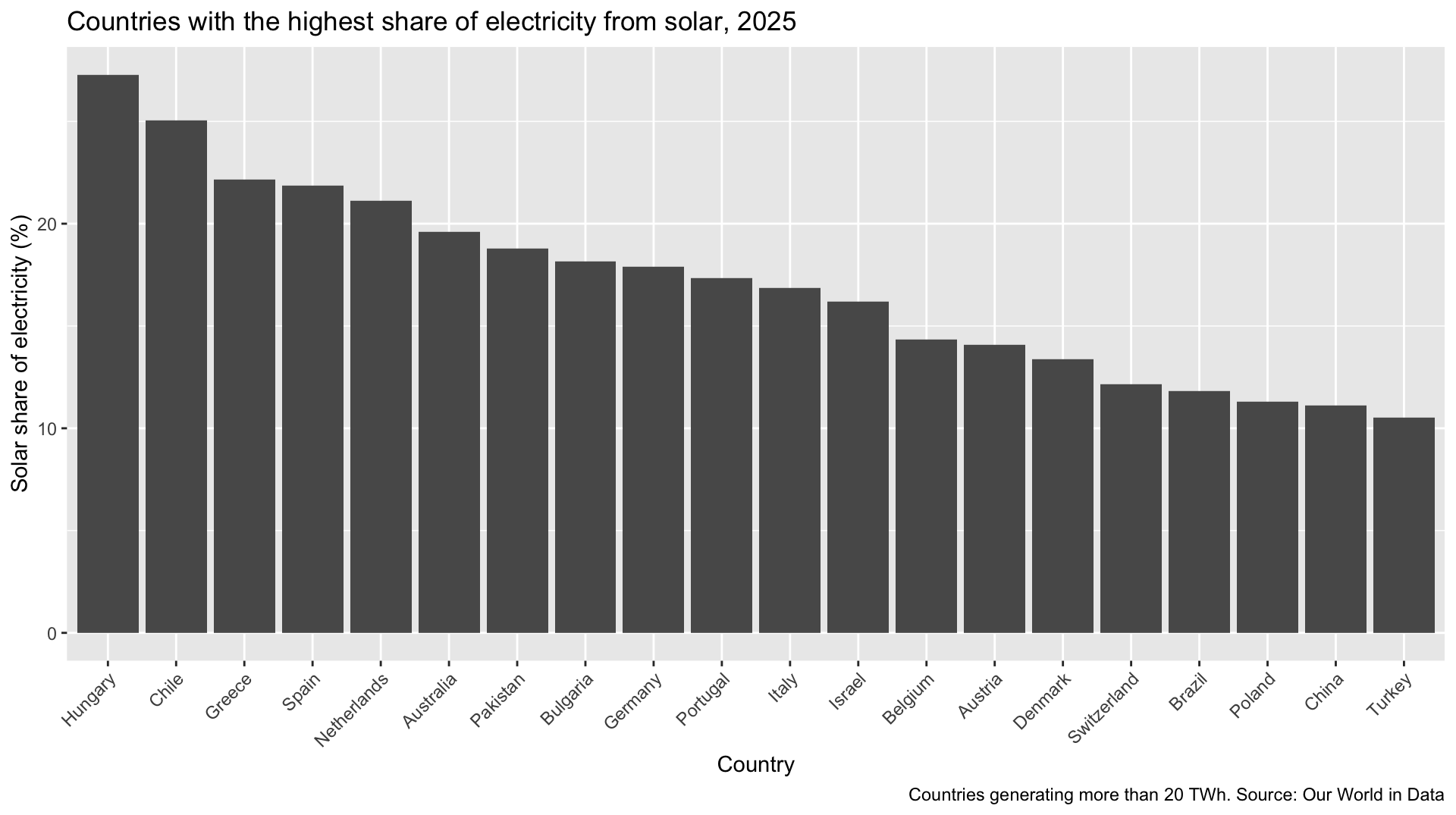
Chart C: electricity mix by country
Code
mix_countries <- c(
  "Brazil",
  "China",
  "Germany",
  "India",
  "Japan",
  "Pakistan",
  "Spain",
  "United States"
)

mix_long <- electricity |>
  filter(country %in% mix_countries) |>
  select(country, year, coal:other_renewables) |>
  pivot_longer(
    cols = coal:other_renewables,
    names_to = "source",
    values_to = "share"
  ) |>
  mutate(source = str_replace(source, "_", " ") |> str_to_sentence())

ggplot(data = mix_long, mapping = aes(x = year, y = share, fill = source)) +
  geom_area() +
  facet_wrap(vars(country), nrow = 2) +
  labs(
    title = "Electricity generation by source, 2000-2025",
    x = "Year",
    y = "Share of electricity (%)",
    fill = "Source",
    caption = "Source: Our World in Data"
  ) +
  theme(legend.position = "bottom")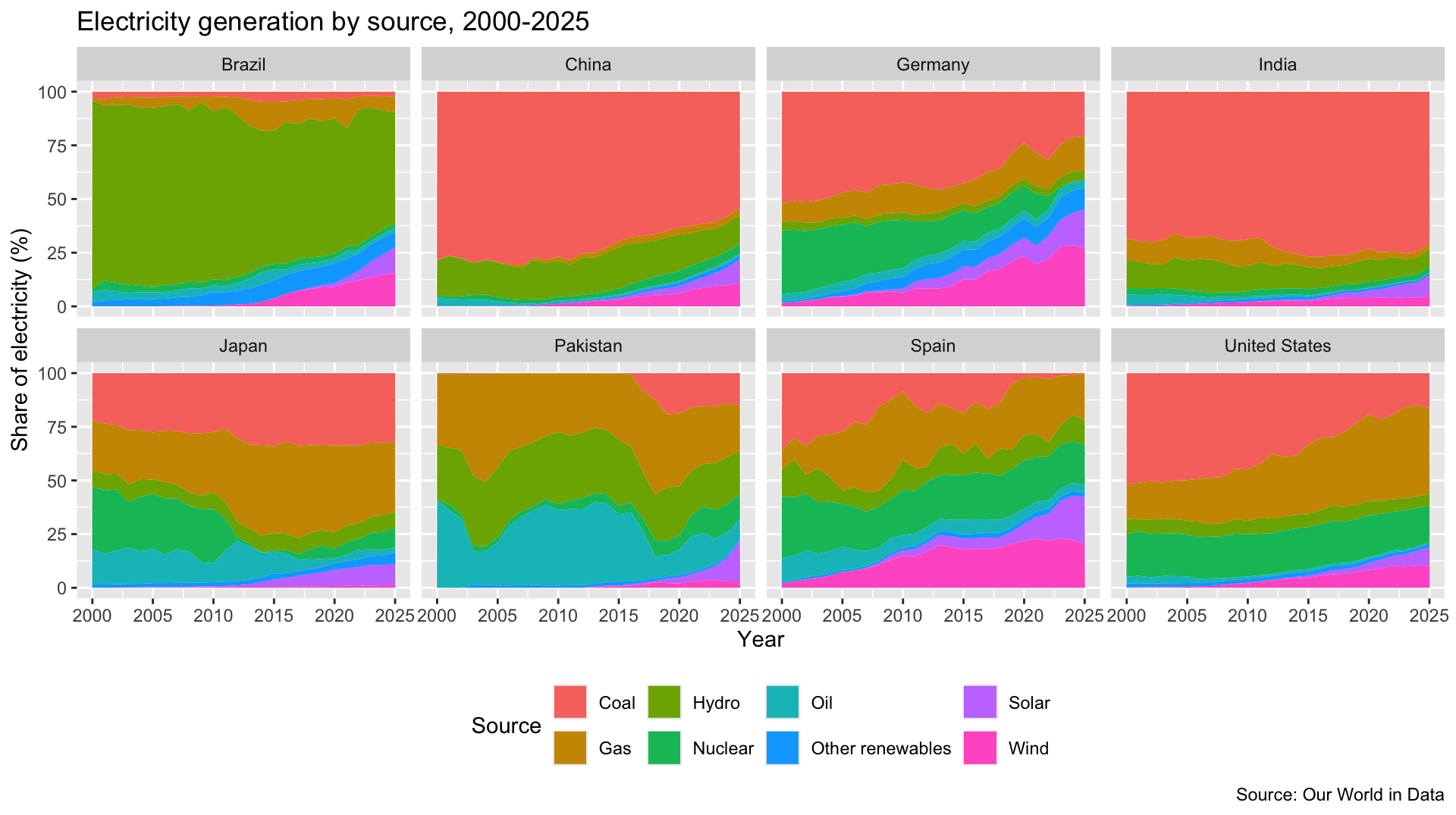
Part 2: Sketch a redesign
Your turn: On your worksheet, sketch a mobile version of your group’s chart inside the phone frame. Use at least three of the redesign strategies and name them next to your sketch.
| Strategy | What changes |
|---|---|
| Resize | Aspect ratio, text size |
| Reposition | Legend becomes direct labels; context moves into the title and subtitle |
| Reduce | Fewer series, highlight one, top N, aggregate |
| Transpose | Flip axes; stack facets vertically |
| Split | One idea per screen; becomes a carousel |
Your turn: Swap with another group. Check their sketch against the checklist and suggest one change.
Part 3: Implement and export
Your turn: Implement your sketch in {ggplot2} using the code cell for your group’s chart. Each cell starts with the desktop version. Make at least three changes, then export the chart at phone size with ggsave().
ggsave(width = 4, height = 5, dpi = 270) creates a 1080 × 1350 pixel image, Instagram’s 4:5 portrait size. Text size on a phone depends on the width you save at, not the dpi.
phone_preview() shows a saved image at about the width of a phone screen (390 pixels) and gives you a link to download it. Run the cell after every change. Is every piece of text readable? Revise and re-run until it is.
Chart A
Chart B
Chart C
Check it on your phone
Your turn: Once you are happy with your chart, click the download link under the preview and send the image to your phone (AirDrop or email it to yourself). Does it hold up on a real screen?